Warrior Onboarding
Purpose
This SOP outlines the step-by-step process for conducting warrior onboarding.
Responsibilities
List the roles involved and their responsibilities in this process, e.g.
Roles | Responsibilities |
Talent Executive |
|
Prerequisites / Requirements
- Access to Induction Coordination - Malaysia Teams channel / Able to receive emails detailing Warrior's data filled in the Induction form.
- Access to PD_OnboardingTracking Excel file.
- Access to Onboarding Form.
- Access to PD_PMGT_Onboarding folder.
Flow Overview
Procedure (Step-by-Step)
1. New Warrior joins the company
This SOP is triggered when a new Warrior joins the company.
You will receive a notification via the Induction Coordination – Malaysia Teams channel and/or an automated email.
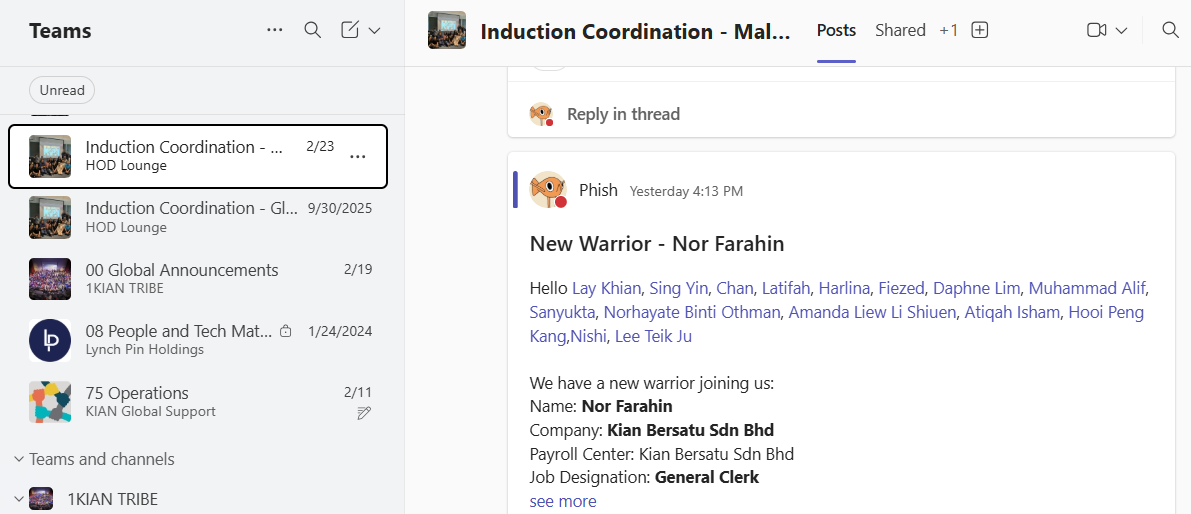
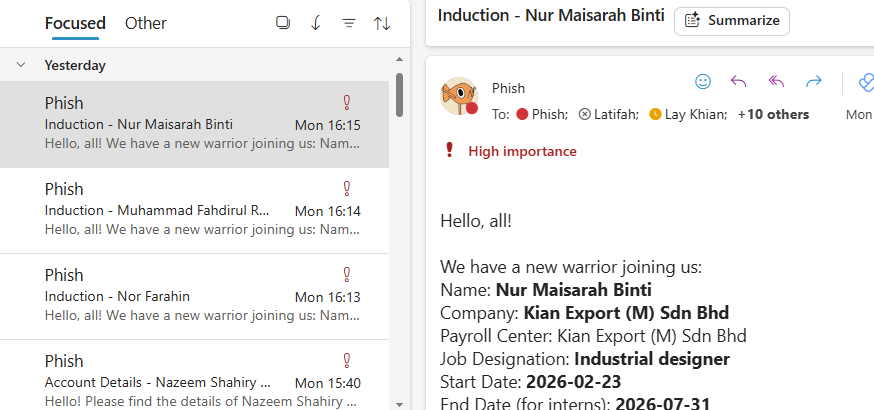
If you do not have access to the Teams channel or do not receive the automated email, please inform your HOD and the Tech Team immediately.
2. Update the Onboarding Tracking file
Open the PD_OnboardingTracking Excel file and update the following details:
Start Date
Name (Warrior’s full name)
Leader
Company
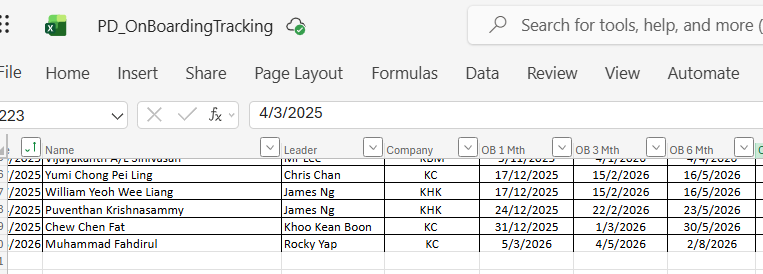
Do not fill in the columns OB 1 Mth, OB 3 Mth, and OB 6 Mth. These fields contain formulas that automatically calculate the onboarding dates based on the Start Date entered.
3. Coordinate Onboarding session with the Warrior and their HOD
If the onboarding session is scheduled to take place within the next 2–3 weeks, coordinate with the Warrior’s HOD to confirm their availability for the session.
The HOD will typically propose available dates. Once a date has been agreed upon, confirm the onboarding session date with the Warrior.
4. Finalising Onboarding coordination
Send a Microsoft Teams meeting invitation to the Warrior and their HOD as a reminder of the scheduled onboarding session. If you are unsure of how to send a Microsoft Teams meeting, please refer to this SOP:
Send the onboarding form to the Warrior for completion. The Warrior must complete and submit the form at least 1 week before the onboarding session.
5. Transfer Onboarding data from Form to a Word file
Note: You may find all the files needed for this step in the PD_PMGT_Onboarding folder.
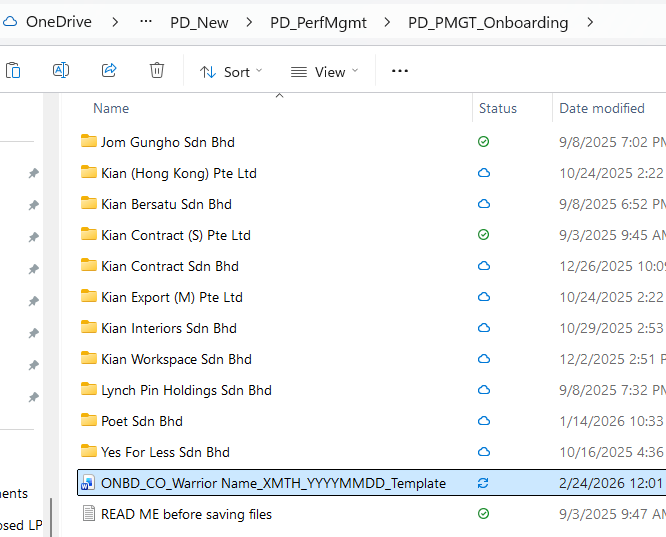
Once the Warrior has completed the Onboarding Form, duplicate the file ONBD_CO_Warrior Name_XMTH_YYYYMMDD_Template into the relevant company sub-folder.
Rename the duplicated file using the following format: ONBD_[CompanyCode][Warrior Name][XMTH]_[YYYYMMDD]
Example: ONBD_LPH_Evelyn Seng_6MTH_20190410
Complete the template in full, based on the information provided in the Warrior’s submitted Onboarding Form.
This document will be used during the onboarding session.
6. Facilitate the Onboarding session
Going through the responses from the Form, get feedback from HOD & Warriors.
Keep everything PNC within the dept + management.
7. Discuss with HOD on the confirmation decision
After the onboarding session, arrange a separate discussion with the Warrior’s HOD to determine the outcome of the onboarding review.
The possible outcomes are as follows:
- Early Confirmation
If the Warrior’s performance and behaviour meet company expectations, the HOD may confirm the Warrior before the end of the probation period. - Continue Probation (As Planned)
If the HOD requires additional time for observation, the probation period will continue as originally scheduled. - Probation Extension
If further evaluation is required beyond the initial probation period, the probation may be formally extended after the six (6) months period. - Non-Confirmation
If the Warrior’s performance does not meet expectations, the HOD may decide not to confirm the Warrior’s position.
After the discussion with the HOD, the Warrior must be formally informed of the decision. Update the Work Status accordingly in the PD_OnboardingTracking file.
8. Prepare for People Team update
Update OB status in team meeting.
Next Steps
- If the Warrior is confirmed, proceed to [Done on Lucid]
- If the probation period is extended, proceed to
- If the Warrior is not confirmed, proceed to
Revision History
Version | Description of Changes | Updated By |
10/10/2025 09:10:15 | Initial SOP Creation | Phish |